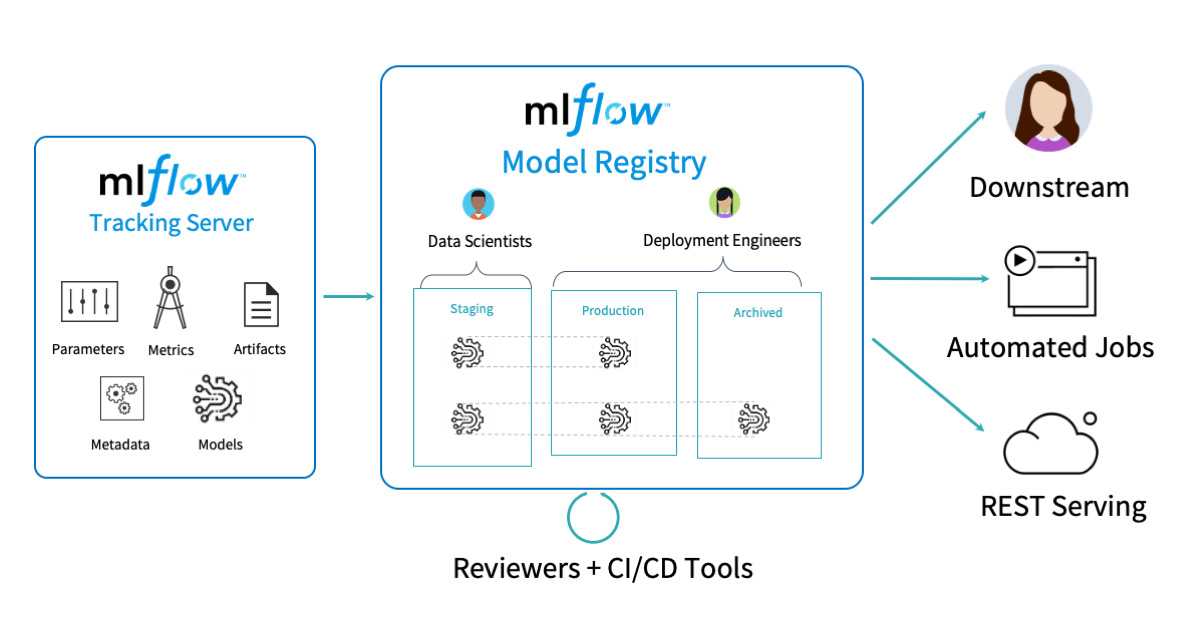
MLflow is an open-source platform for managing the machine learning lifecycle, including experimentation, reproducibility, deployment, and model registry. This guide covers how to integrate MLflow with PyTorch for comprehensive ML workflow management. ## Installation and Setup
Install MLflow
pip install mlflow
pip install torch torchvision
Start MLflow UI
mlflow uiThis starts the MLflow UI at http://localhost:5000
Basic Configuration
import mlflow
import mlflow.pytorch
import torch
import torch.nn as nn
import torch.optim as optim
from torch.utils.data import DataLoader

# Set tracking URI (optional - defaults to local)
mlflow.set_tracking_uri("http://localhost:5000")

# Set experiment name
mlflow.set_experiment("pytorch_experiments")
Basic MLflow Concepts
- Experiment: A collection of runs for a particular task
- Run: A single execution of your ML code
- Artifact: Files generated during a run (models, plots, data)
- Metric: Numerical values tracked over time
- Parameter: Input configurations for your run
Experiment Tracking
Basic Run Structure
import mlflow

with mlflow.start_run():
    # Your training code here
    mlflow.log_param("learning_rate", 0.001)
    mlflow.log_metric("accuracy", 0.95)
    mlflow.log_artifact("model.pth")
Complete Training Example
import torch
import torch.nn as nn
import torch.optim as optim
import mlflow
import mlflow.pytorch
from sklearn.metrics import accuracy_score
import numpy as np

class SimpleNet(nn.Module):
    def __init__(self, input_size, hidden_size, num_classes):
        super(SimpleNet, self).__init__()
        self.fc1 = nn.Linear(input_size, hidden_size)
        self.relu = nn.ReLU()
        self.fc2 = nn.Linear(hidden_size, num_classes)

    def forward(self, x):
        out = self.fc1(x)
        out = self.relu(out)
        out = self.fc2(out)
        return out

def train_model():
    # Hyperparameters
    input_size = 784
    hidden_size = 128
    num_classes = 10
    learning_rate = 0.001
    batch_size = 64
    num_epochs = 10

    # Start MLflow run
    with mlflow.start_run():
        # Log hyperparameters
        mlflow.log_param("input_size", input_size)
        mlflow.log_param("hidden_size", hidden_size)
        mlflow.log_param("num_classes", num_classes)
        mlflow.log_param("learning_rate", learning_rate)
        mlflow.log_param("batch_size", batch_size)
        mlflow.log_param("num_epochs", num_epochs)

        # Initialize model
        model = SimpleNet(input_size, hidden_size, num_classes)
        criterion = nn.CrossEntropyLoss()
        optimizer = optim.Adam(model.parameters(), lr=learning_rate)

        # Training loop
        for epoch in range(num_epochs):
            running_loss = 0.0
            correct = 0
            total = 0

            # Simulate training data
            for i in range(100):  # 100 batches
                # Generate dummy data
                inputs = torch.randn(batch_size, input_size)
                labels = torch.randint(0, num_classes, (batch_size,))

                optimizer.zero_grad()
                outputs = model(inputs)
                loss = criterion(outputs, labels)
                loss.backward()
                optimizer.step()

                running_loss += loss.item()
                _, predicted = torch.max(outputs.data, 1)
                total += labels.size(0)
                correct += (predicted == labels).sum().item()

            # Calculate metrics
            epoch_loss = running_loss / 100
            epoch_acc = 100 * correct / total

            # Log metrics
            mlflow.log_metric("loss", epoch_loss, step=epoch)
            mlflow.log_metric("accuracy", epoch_acc, step=epoch)

            print(f'Epoch [{epoch+1}/{num_epochs}], Loss: {epoch_loss:.4f}, Accuracy: {epoch_acc:.2f}%')

        # Log model
        mlflow.pytorch.log_model(model, "model")

        # Log additional artifacts
        torch.save(model.state_dict(), "model_state_dict.pth")
        mlflow.log_artifact("model_state_dict.pth")

# Run training
train_model()
Model Logging
Different Ways to Log PyTorch Models
1. Log Complete Model
# Log the entire model
mlflow.pytorch.log_model(model, "complete_model")
2. Log Model State Dict
# Save and log state dict
torch.save(model.state_dict(), "model_state_dict.pth")
mlflow.log_artifact("model_state_dict.pth")
3. Log with Custom Code
# Log model with custom code for loading
mlflow.pytorch.log_model(
    model,
    "model",
    code_paths=["model_definition.py"]  # Include custom model definition
)
4. Log with Conda Environment
import mlflow.pytorch

# Create conda environment specification
conda_env = {
    'channels': ['defaults', 'pytorch'],
    'dependencies': [
        'python=3.8',
        'pytorch',
        'torchvision',
        {'pip': ['mlflow']}
    ],
    'name': 'pytorch_env'
}

mlflow.pytorch.log_model(
    model,
    "model",
    conda_env=conda_env
)
Model Registry
Register Model
# Register model during logging
mlflow.pytorch.log_model(
    model,
    "model",
    registered_model_name="MyPyTorchModel"
)

# Or register existing run
model_uri = "runs:/your_run_id/model"
mlflow.register_model(model_uri, "MyPyTorchModel")
Model Versioning and Stages
from mlflow.tracking import MlflowClient

client = MlflowClient()

# Transition model to different stages
client.transition_model_version_stage(
    name="MyPyTorchModel",
    version=1,
    stage="Production"
)

# Get model by stage
model_version = client.get_latest_versions(
    "MyPyTorchModel",
    stages=["Production"]
)[0]
Load Registered Model
# Load model from registry
model = mlflow.pytorch.load_model(
    model_uri=f"models:/MyPyTorchModel/Production"
)

# Or load specific version
model = mlflow.pytorch.load_model(
    model_uri=f"models:/MyPyTorchModel/1"
)
Model Deployment
Local Serving
# Serve model locally
# Run in terminal:
# mlflow models serve -m models:/MyPyTorchModel/Production -p 1234
Prediction with Served Model
import requests
import json

# Prepare data
data = {
    "inputs": [[1.0, 2.0, 3.0, 4.0]]  # Your input features
}

# Make prediction request
response = requests.post(
    "http://localhost:1234/invocations",
    headers={"Content-Type": "application/json"},
    data=json.dumps(data)
)

predictions = response.json()
print(predictions)
Docker Deployment
# Build Docker image
mlflow models build-docker -m models:/MyPyTorchModel/Production -n my-pytorch-model

# Run Docker container
docker run -p 8080:8080 my-pytorch-model
Advanced Features
Custom MLflow Model
import mlflow.pyfunc

class PyTorchModelWrapper(mlflow.pyfunc.PythonModel):
    def __init__(self, model):
        self.model = model

    def predict(self, context, model_input):
        # Custom prediction logic
        with torch.no_grad():
            tensor_input = torch.FloatTensor(model_input.values)
            predictions = self.model(tensor_input)
            return predictions.numpy()

# Log custom model
wrapped_model = PyTorchModelWrapper(model)
mlflow.pyfunc.log_model(
    "custom_model",
    python_model=wrapped_model
)
Automatic Logging
# Enable automatic logging
mlflow.pytorch.autolog()

# Your training code - metrics and models are logged automatically
with mlflow.start_run():
    # Training happens here
    pass
Logging Hyperparameter Sweeps
import itertools

# Define hyperparameter grid
param_grid = {
    'learning_rate': [0.001, 0.01, 0.1],
    'hidden_size': [64, 128, 256],
    'batch_size': [32, 64, 128]
}

# Run experiments
for params in [dict(zip(param_grid.keys(), v))
               for v in itertools.product(*param_grid.values())]:
    with mlflow.start_run():
        # Log parameters
        for key, value in params.items():
            mlflow.log_param(key, value)

        # Train model with these parameters
        model = train_with_params(params)

        # Log results
        mlflow.log_metric("final_accuracy", accuracy)
        mlflow.pytorch.log_model(model, "model")
Logging Artifacts and Plots
import matplotlib.pyplot as plt
import seaborn as sns

# Create and log plots
def log_training_plots(train_losses, val_losses):
    plt.figure(figsize=(10, 6))
    plt.plot(train_losses, label='Training Loss')
    plt.plot(val_losses, label='Validation Loss')
    plt.xlabel('Epoch')
    plt.ylabel('Loss')
    plt.legend()
    plt.title('Training and Validation Loss')
    plt.savefig('loss_plot.png')
    mlflow.log_artifact('loss_plot.png')
    plt.close()

# Log confusion matrix
def log_confusion_matrix(y_true, y_pred, class_names):
    from sklearn.metrics import confusion_matrix
    import seaborn as sns

    cm = confusion_matrix(y_true, y_pred)
    plt.figure(figsize=(8, 6))
    sns.heatmap(cm, annot=True, fmt='d', cmap='Blues',
                xticklabels=class_names, yticklabels=class_names)
    plt.title('Confusion Matrix')
    plt.savefig('confusion_matrix.png')
    mlflow.log_artifact('confusion_matrix.png')
    plt.close()
Best Practices
1. Organize Experiments
# Use descriptive experiment names
mlflow.set_experiment("image_classification_resnet")

# Use run names for specific configurations
with mlflow.start_run(run_name="resnet50_adam_lr001"):
    pass
2. Comprehensive Logging
def comprehensive_logging(model, optimizer, criterion, config):
    # Log hyperparameters
    mlflow.log_params(config)

    # Log model architecture info
    total_params = sum(p.numel() for p in model.parameters())
    mlflow.log_param("total_parameters", total_params)
    mlflow.log_param("model_architecture", str(model))

    # Log optimizer info
    mlflow.log_param("optimizer", type(optimizer).__name__)
    mlflow.log_param("criterion", type(criterion).__name__)

    # Log system info
    mlflow.log_param("cuda_available", torch.cuda.is_available())
    if torch.cuda.is_available():
        mlflow.log_param("gpu_name", torch.cuda.get_device_name(0))
3. Error Handling
def safe_mlflow_run(training_function, **kwargs):
    try:
        with mlflow.start_run():
            result = training_function(**kwargs)
            mlflow.log_param("status", "success")
            return result
    except Exception as e:
        mlflow.log_param("status", "failed")
        mlflow.log_param("error", str(e))
        raise e
4. Model Comparison
def compare_models():
    # Get experiment
    experiment = mlflow.get_experiment_by_name("pytorch_experiments")
    runs = mlflow.search_runs(experiment_ids=[experiment.experiment_id])

    # Sort by accuracy
    best_runs = runs.sort_values("metrics.accuracy", ascending=False)

    print("Top 5 models by accuracy:")
    print(best_runs[["run_id", "metrics.accuracy", "params.learning_rate"]].head())
5. Model Loading Best Practices
def load_model_safely(model_uri):
    try:
        model = mlflow.pytorch.load_model(model_uri)
        model.eval()  # Set to evaluation mode
        return model
    except Exception as e:
        print(f"Error loading model: {e}")
        return None

# Usage
model = load_model_safely("models:/MyPyTorchModel/Production")
if model:
    # Use model for inference
    pass
Summary
MLflow provides a comprehensive solution for managing PyTorch ML workflows:
- Experiment Tracking: Log parameters, metrics, and artifacts
- Model Management: Version and organize your models
- Model Registry: Centralized model store with lifecycle management
- Deployment: Easy model serving and deployment options
- Reproducibility: Track everything needed to reproduce experiments
Start with basic experiment tracking, then gradually adopt more advanced features like the model registry and deployment capabilities as your ML workflow matures.