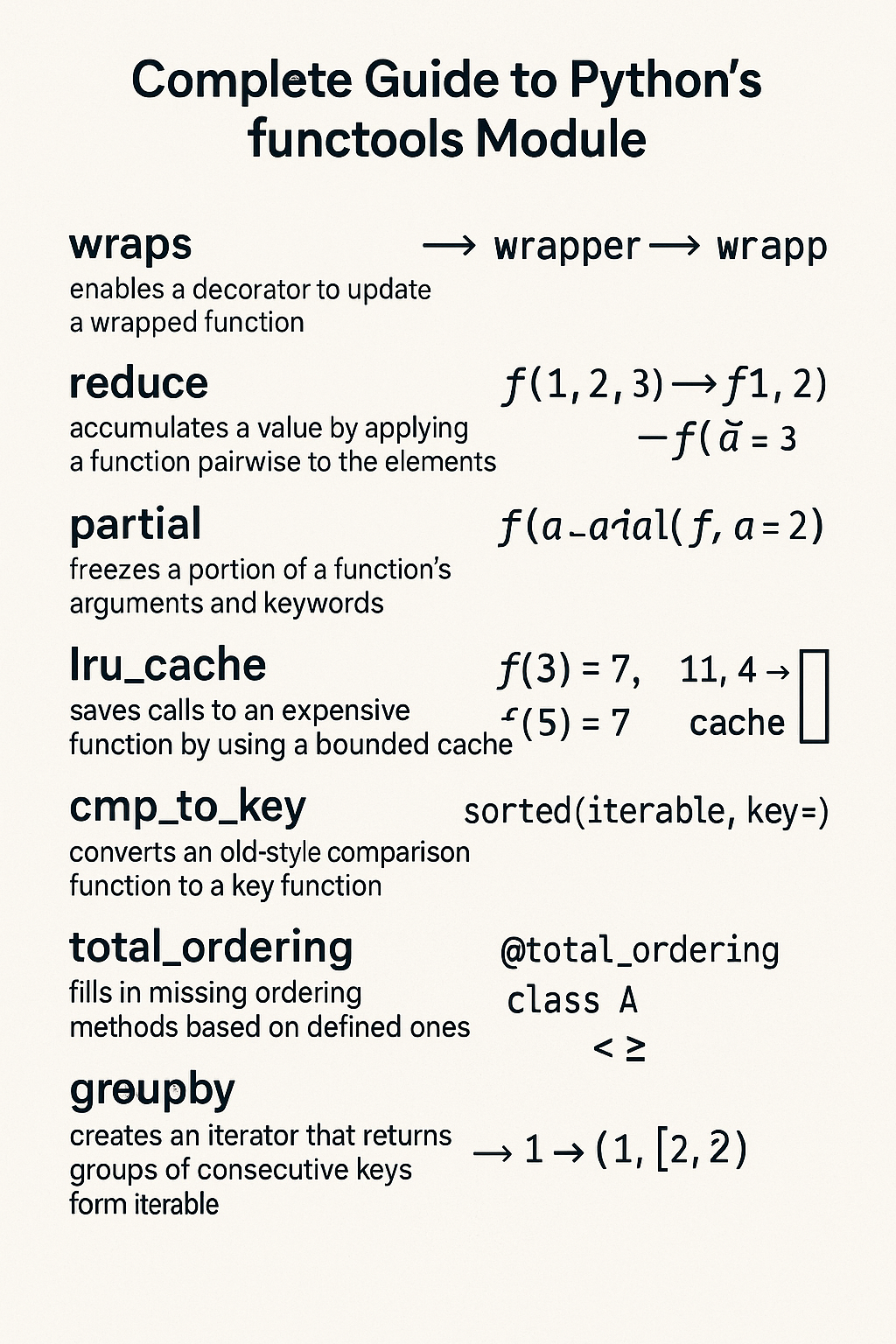
The functools module in Python provides utilities for working with higher-order functions and operations on callable objects. It’s a powerful toolkit for functional programming patterns, performance optimization, and code organization.
Introduction
The functools module is part of Python’s standard library and provides essential tools for functional programming. It helps you create more efficient, reusable, and maintainable code by offering utilities for function manipulation, caching, and composition. It’s particularly useful for:
- Creating decorators
- Implementing caching mechanisms
- Partial function application
- Functional programming patterns
- Performance optimization
import functoolsCore Decorators
@functools.wraps
The @functools.wraps decorator is fundamental for creating proper decorators. It copies metadata from the original function to the wrapper function, preserving important attributes like __name__, __doc__, and __module__.
import functools

def my_decorator(func):
    @functools.wraps(func)
    def wrapper(*args, **kwargs):
        print(f"Calling {func.__name__}")
        return func(*args, **kwargs)
    return wrapper

@my_decorator
def greet(name):
    """Greet someone by name."""
    return f"Hello, {name}!"

print(greet.__name__)  # Output: greet
print(greet.__doc__)   # Output: Greet someone by name.
greet
Greet someone by name.Without @functools.wraps, the wrapper function would lose the original function’s metadata:
def bad_decorator(func):
    def wrapper(*args, **kwargs):
        print(f"Calling function")
        return func(*args, **kwargs)
    return wrapper

@bad_decorator
def say_hello(name):
    """Say hello to someone."""
    return f"Hello, {name}!"

print(say_hello.__name__)  # Output: wrapper (not say_hello!)
print(say_hello.__doc__)   # Output: None
wrapper
None@functools.lru_cache
The @functools.lru_cache decorator implements a Least Recently Used (LRU) cache for function results. It’s excellent for optimizing recursive functions and expensive computations.
import functools

@functools.lru_cache(maxsize=128)
def fibonacci(n):
    """Calculate Fibonacci number with memoization."""
    if n < 2:
        return n
    return fibonacci(n - 1) + fibonacci(n - 2)

# Performance comparison
import time

def fibonacci_slow(n):
    """Fibonacci without caching."""
    if n < 2:
        return n
    return fibonacci_slow(n - 1) + fibonacci_slow(n - 2)

# Cached version
start = time.time()
result_fast = fibonacci(35)
fast_time = time.time() - start

# Clear cache and test uncached version
fibonacci.cache_clear()
start = time.time()
result_slow = fibonacci_slow(35)
slow_time = time.time() - start

print(f"Cached result: {result_fast} (Time: {fast_time:.4f}s)")
print(f"Uncached result: {result_slow} (Time: {slow_time:.4f}s)")
Cached result: 9227465 (Time: 0.0000s)
Uncached result: 9227465 (Time: 0.6688s)Cache Management
The lru_cache decorator provides methods for cache management:
@functools.lru_cache(maxsize=128)
def expensive_function(x, y):
    """Simulate an expensive computation."""
    time.sleep(0.1)  # Simulate work
    return x * y + x ** y

# Use the function
result1 = expensive_function(2, 3)
result2 = expensive_function(2, 3)  # This will be cached

# Check cache statistics
print(expensive_function.cache_info())
# Output: CacheInfo(hits=1, misses=1, maxsize=128, currsize=1)

# Clear the cache
expensive_function.cache_clear()
print(expensive_function.cache_info())
# Output: CacheInfo(hits=0, misses=0, maxsize=128, currsize=0)
CacheInfo(hits=1, misses=1, maxsize=128, currsize=1)
CacheInfo(hits=0, misses=0, maxsize=128, currsize=0)@functools.cache (Python 3.9+)
The @functools.cache decorator is a simplified version of lru_cache with no size limit:
import functools

@functools.cache
def factorial(n):
    """Calculate factorial with unlimited caching."""
    if n <= 1:
        return 1
    return n * factorial(n - 1)

print(factorial(10))  # 3628800
print(factorial.cache_info())
3628800
CacheInfo(hits=0, misses=10, maxsize=None, currsize=10)@functools.cached_property
Transforms a method into a property that caches its result after the first call.
import functools
import time

class DataProcessor:
    def __init__(self, data):
        self.data = data

    @functools.cached_property
    def processed_data(self):
        """Expensive data processing that should only run once"""
        print("Processing data...")
        time.sleep(1)  # Simulate expensive operation
        return [x * 2 for x in self.data]

processor = DataProcessor([1, 2, 3, 4, 5])
print(processor.processed_data)  # Takes 1 second
print(processor.processed_data)  # Instant, uses cached result
Processing data...
[2, 4, 6, 8, 10]
[2, 4, 6, 8, 10]Partial Function Application
functools.partial
The functools.partial function creates partial function applications, allowing you to fix certain arguments of a function and create a new callable.
import functools

def multiply(x, y, z):
    """Multiply three numbers."""
    return x * y * z

# Create a partial function that always multiplies by 2 and 3
double_triple = functools.partial(multiply, 2, 3)

print(double_triple(4))  # Output: 24 (2 * 3 * 4)

# You can also fix keyword arguments
def greet(greeting, name, punctuation="!"):
    return f"{greeting}, {name}{punctuation}"

# Create a partial for casual greetings
casual_greet = functools.partial(greet, "Hey", punctuation=".")

print(casual_greet("Alice"))  # Output: Hey, Alice.
24
Hey, Alice.Practical Example: Event Handling
import functools

def handle_event(event_type, handler_name, data):
    """Generic event handler."""
    print(f"[{event_type}] {handler_name}: {data}")

# Create specific event handlers
handle_click = functools.partial(handle_event, "CLICK")
handle_keypress = functools.partial(handle_event, "KEYPRESS")

# Use the handlers
button_click = functools.partial(handle_click, "button_handler")
input_keypress = functools.partial(handle_keypress, "input_handler")

button_click("Button was clicked")
input_keypress("Enter key pressed")
[CLICK] button_handler: Button was clicked
[KEYPRESS] input_handler: Enter key pressedfunctools.partialmethod
The functools.partialmethod is designed for creating partial methods in classes:
import functools

class Calculator:
    def __init__(self):
        self.result = 0

    def operation(self, op, value):
        if op == "add":
            self.result += value
        elif op == "multiply":
            self.result *= value
        elif op == "subtract":
            self.result -= value
        return self.result

    # Create partial methods
    add = functools.partialmethod(operation, "add")
    multiply = functools.partialmethod(operation, "multiply")
    subtract = functools.partialmethod(operation, "subtract")

calc = Calculator()
calc.add(5)        # result = 5
calc.multiply(3)   # result = 15
calc.subtract(2)   # result = 13
print(calc.result) # Output: 1313Comparison and Ordering
functools.total_ordering
The @functools.total_ordering decorator automatically generates comparison methods based on __eq__ and one ordering method:
import functools

@functools.total_ordering
class Student:
    def __init__(self, name, grade):
        self.name = name
        self.grade = grade

    def __eq__(self, other):
        if not isinstance(other, Student):
            return NotImplemented
        return self.grade == other.grade

    def __lt__(self, other):
        if not isinstance(other, Student):
            return NotImplemented
        return self.grade < other.grade

    def __repr__(self):
        return f"Student('{self.name}', {self.grade})"

# Now all comparison operators work
alice = Student("Alice", 85)
bob = Student("Bob", 92)
charlie = Student("Charlie", 85)

print(alice < bob)      # True
print(alice > bob)      # False
print(alice <= bob)     # True
print(alice >= bob)     # False
print(alice == charlie) # True
print(alice != bob)     # True

# Sorting works too
students = [bob, alice, charlie]
students.sort()
print(students)  # [Student('Alice', 85), Student('Charlie', 85), Student('Bob', 92)]
True
False
True
False
True
True
[Student('Alice', 85), Student('Charlie', 85), Student('Bob', 92)]functools.cmp_to_key
The functools.cmp_to_key function converts old-style comparison functions to key functions for use with sorting:
import functools

def compare_strings(a, b):
    """Old-style comparison function."""
    # Compare by length first, then alphabetically
    if len(a) != len(b):
        return len(a) - len(b)
    if a < b:
        return -1
    elif a > b:
        return 1
    return 0

# Convert to key function
key_func = functools.cmp_to_key(compare_strings)

words = ["apple", "pie", "banana", "cat", "elephant"]
sorted_words = sorted(words, key=key_func)
print(sorted_words)  # ['cat', 'pie', 'apple', 'banana', 'elephant']
['cat', 'pie', 'apple', 'banana', 'elephant']Caching and Memoization
Advanced Caching Strategies
import functools
import time
from typing import Any, Callable

def timed_cache(seconds: int):
    """Custom decorator for time-based caching."""
    def decorator(func: Callable) -> Callable:
        cache = {}

        @functools.wraps(func)
        def wrapper(*args, **kwargs):
            # Create a key from arguments
            key = str(args) + str(sorted(kwargs.items()))
            current_time = time.time()

            # Check if result is cached and still valid
            if key in cache:
                result, timestamp = cache[key]
                if current_time - timestamp < seconds:
                    return result

            # Calculate new result and cache it
            result = func(*args, **kwargs)
            cache[key] = (result, current_time)
            return result

        return wrapper
    return decorator

@timed_cache(seconds=5)
def get_current_time():
    """Get current time (cached for 5 seconds)."""
    return time.time()

# Test the timed cache
print(get_current_time())  # Fresh calculation
time.sleep(2)
print(get_current_time())  # Cached result (same as above)
time.sleep(4)
print(get_current_time())  # Fresh calculation (cache expired)
1751948377.506505
1751948377.506505
1751948383.515122Cache with Custom Key Function
import functools

def custom_cache(key_func=None):
    """Cache decorator with custom key function."""
    def decorator(func):
        cache = {}

        @functools.wraps(func)
        def wrapper(*args, **kwargs):
            if key_func:
                key = key_func(*args, **kwargs)
            else:
                key = str(args) + str(sorted(kwargs.items()))

            if key in cache:
                return cache[key]

            result = func(*args, **kwargs)
            cache[key] = result
            return result

        wrapper.cache_clear = cache.clear
        wrapper.cache_info = lambda: f"Cache size: {len(cache)}"
        return wrapper
    return decorator

# Example: Cache based on first argument only
@custom_cache(key_func=lambda x, y: x)
def expensive_computation(x, y):
    """Expensive computation cached by first argument only."""
    print(f"Computing for {x}, {y}")
    return x ** y

print(expensive_computation(2, 3))  # Computing for 2, 3 -> 8
print(expensive_computation(2, 5))  # Uses cached result -> 8 (wrong but demonstrates key function)
Computing for 2, 3
8
8Function Composition
functools.reduce
The functools.reduce function applies a function cumulatively to items in a sequence:
import functools
import operator

# Sum all numbers
numbers = [1, 2, 3, 4, 5]
total = functools.reduce(operator.add, numbers)
print(total)  # Output: 15

# Find maximum
maximum = functools.reduce(lambda x, y: x if x > y else y, numbers)
print(maximum)  # Output: 5

# Multiply all numbers
product = functools.reduce(operator.mul, numbers)
print(product)  # Output: 120

# Flatten nested lists
nested_lists = [[1, 2], [3, 4], [5, 6]]
flattened = functools.reduce(operator.add, nested_lists)
print(flattened)  # Output: [1, 2, 3, 4, 5, 6]

# With initial value
result = functools.reduce(operator.add, numbers, 100)
print(result)  # Output: 115 (100 + 15)
15
5
120
[1, 2, 3, 4, 5, 6]
115Building Complex Operations
import functools
import operator

def compose(*functions):
    """Compose multiple functions into a single function."""
    return functools.reduce(lambda f, g: lambda x: f(g(x)), functions, lambda x: x)

# Example functions
def add_one(x):
    return x + 1

def multiply_by_two(x):
    return x * 2

def square(x):
    return x ** 2

# Compose functions
composed = compose(square, multiply_by_two, add_one)
print(composed(3))  # ((3 + 1) * 2) ** 2 = 64

# Dictionary operations with reduce
def merge_dicts(*dicts):
    """Merge multiple dictionaries."""
    return functools.reduce(
        lambda acc, d: {**acc, **d},
        dicts,
        {}
    )

dict1 = {"a": 1, "b": 2}
dict2 = {"c": 3, "d": 4}
dict3 = {"e": 5, "f": 6}

merged = merge_dicts(dict1, dict2, dict3)
print(merged)  # {'a': 1, 'b': 2, 'c': 3, 'd': 4, 'e': 5, 'f': 6}
64
{'a': 1, 'b': 2, 'c': 3, 'd': 4, 'e': 5, 'f': 6}Advanced Usage Patterns
Decorator Factories
import functools
import time

def retry(max_attempts=3, delay=1):
    """Decorator factory for retrying failed operations."""
    def decorator(func):
        @functools.wraps(func)
        def wrapper(*args, **kwargs):
            for attempt in range(max_attempts):
                try:
                    return func(*args, **kwargs)
                except Exception as e:
                    if attempt == max_attempts - 1:
                        raise e
                    print(f"Attempt {attempt + 1} failed: {e}. Retrying in {delay}s...")
                    time.sleep(delay)
            return None
        return wrapper
    return decorator

@retry(max_attempts=3, delay=0.5)
def unreliable_function():
    """Function that fails randomly."""
    import random
    if random.random() < 0.7:
        raise Exception("Random failure")
    return "Success!"

# Test the retry decorator
# result = unreliable_function()  # May retry up to 3 times
Method Decorators
import functools

class ValidationError(Exception):
    pass

def validate_positive(func):
    """Decorator to validate that arguments are positive."""
    @functools.wraps(func)
    def wrapper(self, *args, **kwargs):
        for arg in args:
            if isinstance(arg, (int, float)) and arg <= 0:
                raise ValidationError(f"Argument {arg} must be positive")
        return func(self, *args, **kwargs)
    return wrapper

class Calculator:
    @validate_positive
    def divide(self, a, b):
        """Divide two positive numbers."""
        return a / b

    @validate_positive
    def sqrt(self, x):
        """Calculate square root of a positive number."""
        return x ** 0.5

calc = Calculator()
print(calc.divide(10, 2))  # 5.0
print(calc.sqrt(16))       # 4.0

# This will raise ValidationError
# calc.divide(-5, 2)
5.0
4.0Contextual Decorators
import functools
import logging

def log_calls(logger=None, level=logging.INFO):
    """Decorator to log function calls."""
    if logger is None:
        logger = logging.getLogger(__name__)

    def decorator(func):
        @functools.wraps(func)
        def wrapper(*args, **kwargs):
            logger.log(level, f"Calling {func.__name__} with args={args}, kwargs={kwargs}")
            try:
                result = func(*args, **kwargs)
                logger.log(level, f"{func.__name__} returned {result}")
                return result
            except Exception as e:
                logger.log(logging.ERROR, f"{func.__name__} raised {type(e).__name__}: {e}")
                raise
        return wrapper
    return decorator

# Setup logging
logging.basicConfig(level=logging.INFO)

@log_calls()
def calculate_area(width, height):
    """Calculate area of a rectangle."""
    return width * height

@log_calls(level=logging.DEBUG)
def divide_numbers(a, b):
    """Divide two numbers."""
    return a / b

# Test the logged functions
result = calculate_area(5, 3)
# result = divide_numbers(10, 0)  # This will log an error
INFO:__main__:Calling calculate_area with args=(5, 3), kwargs={}
INFO:__main__:calculate_area returned 15Advanced Features
functools.singledispatch
Creates generic functions that behave differently based on the type of their first argument.
import functools

@functools.singledispatch
def process_data(data):
    """Default implementation for unknown types"""
    return f"Processing unknown type: {type(data)}"

@process_data.register(str)
def _(data):
    return f"Processing string: '{data}'"

@process_data.register(list)
def _(data):
    return f"Processing list of {len(data)} items"

@process_data.register(dict)
def _(data):
    return f"Processing dict with keys: {list(data.keys())}"

@process_data.register(int)
@process_data.register(float)
def _(data):
    return f"Processing number: {data}"

# Usage
print(process_data("hello"))           # Processing string: 'hello'
print(process_data([1, 2, 3]))         # Processing list of 3 items
print(process_data({"a": 1, "b": 2}))  # Processing dict with keys: ['a', 'b']
print(process_data(42))                # Processing number: 42
print(process_data(3.14))              # Processing number: 3.14
Processing string: 'hello'
Processing list of 3 items
Processing dict with keys: ['a', 'b']
Processing number: 42
Processing number: 3.14functools.singledispatchmethod
Similar to singledispatch but for methods in classes.
import functools

class DataProcessor:
    @functools.singledispatchmethod
    def process(self, data):
        return f"Default processing for {type(data)}"

    @process.register
    def _(self, data: str):
        return f"String processing: {data.upper()}"

    @process.register
    def _(self, data: list):
        return f"List processing: {sum(data) if all(isinstance(x, (int, float)) for x in data) else 'mixed types'}"

    @process.register
    def _(self, data: dict):
        return f"Dict processing: {len(data)} items"

processor = DataProcessor()
print(processor.process("hello"))      # String processing: HELLO
print(processor.process([1, 2, 3, 4])) # List processing: 10
print(processor.process({"a": 1}))     # Dict processing: 1 items
String processing: HELLO
List processing: 10
Dict processing: 1 itemsBest Practices
1. Use @functools.wraps in Custom Decorators
Always use @functools.wraps when creating decorators to preserve function metadata:
import functools

# Good
def my_decorator(func):
    @functools.wraps(func)
    def wrapper(*args, **kwargs):
        # decorator logic here
        return func(*args, **kwargs)
    return wrapper

# Bad - loses function metadata
def bad_decorator(func):
    def wrapper(*args, **kwargs):
        # decorator logic here
        return func(*args, **kwargs)
    return wrapper
2. Choose Appropriate Cache Sizes
For lru_cache, choose cache sizes based on your use case:
import functools

# For small, frequently accessed data
@functools.lru_cache(maxsize=32)
def get_user_preferences(user_id):
    # Small cache for user data
    pass

# For larger datasets or expensive computations
@functools.lru_cache(maxsize=1024)
def complex_calculation(x, y, z):
    # Larger cache for expensive operations
    pass

# For unlimited caching (use with caution)
@functools.cache
def constant_computation(x):
    # Only for truly constant results
    pass
3. Choose the Right Caching Strategy
# For simple cases without arguments
@functools.cache
def simple_function():
    pass

# For functions with arguments and limited cache size
@functools.lru_cache(maxsize=128)
def complex_function(x, y):
    pass

# For properties in classes
class MyClass:
    @functools.cached_property
    def expensive_property(self):
        pass
4. Use Partial Functions for Configuration
import functools
import json

def make_api_call(base_url, endpoint, headers=None, timeout=30):
    """Make an API call with configurable parameters."""
    # Implementation here
    pass

# Create configured API callers
api_v1 = functools.partial(
    make_api_call,
    base_url="https://api.example.com/v1",
    headers={"Authorization": "Bearer token123"}
)

api_v2 = functools.partial(
    make_api_call,
    base_url="https://api.example.com/v2",
    headers={"Authorization": "Bearer token456"},
    timeout=60
)

# Use the configured functions
# result1 = api_v1("/users")
# result2 = api_v2("/products")
5. Performance Considerations
import functools
import time

# Measure cache performance
@functools.lru_cache(maxsize=1000)
def expensive_function(n):
    time.sleep(0.01)  # Simulate expensive operation
    return n ** 2

# Time uncached vs cached calls
start = time.time()
for i in range(100):
    expensive_function(i % 10)  # Only 10 unique values
end = time.time()

print(f"Time taken: {end - start:.4f} seconds")
print(f"Cache info: {expensive_function.cache_info()}")
Time taken: 0.1245 seconds
Cache info: CacheInfo(hits=90, misses=10, maxsize=1000, currsize=10)6. Combine Multiple functools Features
import functools
import time

@functools.lru_cache(maxsize=128)
def fibonacci_cached(n):
    """Fibonacci with caching."""
    if n < 2:
        return n
    return fibonacci_cached(n - 1) + fibonacci_cached(n - 2)

# Create a partial function for specific range
fibonacci_small = functools.partial(fibonacci_cached)

# Use total_ordering for comparison
@functools.total_ordering
class FibonacciNumber:
    def __init__(self, n):
        self.n = n
        self.value = fibonacci_cached(n)

    def __eq__(self, other):
        return self.value == other.value

    def __lt__(self, other):
        return self.value < other.value

    def __repr__(self):
        return f"Fib({self.n}) = {self.value}"

# Example usage
fib_numbers = [FibonacciNumber(i) for i in [8, 5, 10, 3]]
fib_numbers.sort()
print(fib_numbers)  # Sorted by Fibonacci value
[Fib(3) = 2, Fib(5) = 5, Fib(8) = 21, Fib(10) = 55]7. Error Handling with functools
import functools

def safe_divide(func):
    """Decorator to handle division by zero."""
    @functools.wraps(func)
    def wrapper(*args, **kwargs):
        try:
            return func(*args, **kwargs)
        except ZeroDivisionError:
            print(f"Warning: Division by zero in {func.__name__}")
            return float('inf')
    return wrapper

@safe_divide
def calculate_ratio(a, b):
    """Calculate the ratio of two numbers."""
    return a / b

print(calculate_ratio(10, 2))  # 5.0
print(calculate_ratio(10, 0))  # inf (with warning)
5.0
Warning: Division by zero in calculate_ratio
inf8. Debugging Cached Functions
import functools

@functools.lru_cache(maxsize=128)
def debug_function(x):
    print(f"Computing for {x}")
    return x * 2

# Monitor cache usage
def print_cache_stats(func):
    info = func.cache_info()
    print(f"Cache stats for {func.__name__}: {info}")
    hit_rate = info.hits / (info.hits + info.misses) if (info.hits + info.misses) > 0 else 0
    print(f"Hit rate: {hit_rate:.2%}")

# Usage
debug_function(5)
debug_function(5)  # Uses cache
debug_function(10)
print_cache_stats(debug_function)
Computing for 5
Computing for 10
Cache stats for debug_function: CacheInfo(hits=1, misses=2, maxsize=128, currsize=2)
Hit rate: 33.33%Conclusion
The functools module is an essential tool for Python developers who want to write more efficient, maintainable, and functional code. Key takeaways include:
- Use
@functools.wrapsin all custom decorators - Leverage
@functools.lru_cachefor expensive function calls - Apply
functools.partialfor function configuration and specialization - Utilize
@functools.total_orderingto reduce boilerplate in comparison classes - Employ
functools.reducefor complex data transformations - Combine multiple functools features for powerful programming patterns
- Apply
@cached_propertyfor expensive class properties - Use
partialfor function specialization - Implement
@singledispatchfor type-based function overloading
By mastering these tools, you’ll be able to write more elegant and efficient Python code that follows functional programming principles while maintaining readability and performance.